
On this page
Quick verdict
Picsart is one of the best general photo editors available, and its enhancer is genuinely good at making a soft photo sharp. But its Photo Restoration tool is that enhancer under a different name. Shotkit's hands-on test of the tool concluded it "is essentially a photo enhancer being marketed as a restorer" and noted plainly that it "doesn't remove scratches/creases". For those you move to the Remove and Heal brushes and retouch manually on a paid plan. Colorization is a separate Picsart tool again. RestorePhotosApp handles damage, fading, faces, and colour in one pass.
Choose RestorePhotosApp
Best for damaged prints: scratches, creases, stains, fading, lost faces, and colour.
Choose Picsart
Best as an all-round editor: stickers, collages, text, background removal, social content.

“My grandma cried when she saw her wedding photo restored. Absolutely incredible.”
Maria K.

“Uploaded a blurry photo from the 70s and got back a crystal clear image. Like magic.”
James T.

“Finally recovered old family photos I thought were lost forever. So easy to use.”
Sarah M.
See the difference on your own photos
No watermark · No subscription · From $6.99
What Picsart's Photo Restoration tool actually does
Picsart's restoration page promises to auto-fix "color fading, blurriness, smudges, and other blemishes" on damaged old photos, in seconds, with one tap. Run a soft, slightly faded print through it and the promise holds: the image comes back sharper, cleaner, and more saturated. For a photo whose only problem is softness, it is a good free tool and this page does not pretend otherwise.
The problem appears the moment the photo has physical damage. Shotkit tested the tool by hand and reported that it "doesn't remove scratches/creases," adding that "a photo restorer will care for scratches and creases – which the enhancer doesn't do," and concluding that Picsart's restoration "is essentially a photo enhancer being marketed as a restorer." Other testers describe lighter damage cleaning up nicely while results vary on more severe flaws, and note that the output can look artificial.
This is not a bug in Picsart. An enhancer works by increasing local contrast and detail. A crease is local contrast. Sharpening a creased print makes the crease a crisper line, because the tool has no concept of which edges are the photograph and which are the damage. Removing damage requires a model that recognises it as damage and reconstructs what was underneath from the surrounding image, which is a different job.
RestorePhotosApp only does that job. The restore style removes scratches, tears, creases, dust, and stains, corrects fading, and rebuilds detail in faces. Colorize adds colour to black-and-white originals. Cleanup, enhance, sharpen, deblur, and denoise cover the lighter cases. Every style assumes the input is an old photograph of people.
The manual retouching step nobody mentions
Picsart does have a way to remove a scratch: the Remove and Heal tools, which work like a clone-and-patch brush. You zoom into the print, trace each scratch with your finger or cursor, and let the tool fill it in. On one small blemish this takes a moment. On a 1950s portrait with a crease across the whole frame, a torn corner, and forty years of surface scuffing, it is an evening of work, and the result depends entirely on how steady and patient you are.
Two things make this worse at scale. The Remove and Heal tools sit behind a paid plan, so the free restoration that did not remove your scratches cannot be finished without subscribing. And the work does not transfer: every photo in the box needs the same manual pass again, by hand, one at a time.
This is the single clearest difference between the two tools. On RestorePhotosApp the damage removal is the automatic part. You upload the print, pick Restore, and the scratches and creases are gone in the result: no brushing, no zooming, nothing to trace. When there are forty prints, you drop all forty in at once.
Three tools instead of one
If your photo is black and white, faded, and scratched, which describes most photos worth restoring, Picsart asks you to visit three places. The restoration tool for the enhancement pass. The image colorizer, a separate tool, for the colour. The Remove or Heal brush for the damage. Each step re-encodes the image and each step is a separate decision about how far to push it.
RestorePhotosApp's restore style does all three in one pass, and because a single model handles damage, colour, and faces together, they stay consistent with each other. Colour does not bleed across an edge that the damage pass has just rebuilt, because there was no separate damage pass.
If you only want colour and the print is otherwise fine, the colorize style is there on its own. The point is that the common case does not require you to assemble the result from three tools.
What the two pricing models cost for one box of photos
Picsart's Pro plan is $10.50 a month billed annually, or $15 month to month; Ultra is $37.50 a month billed annually, or $47 month to month. Both are fair prices for what Picsart is. Pro includes background removal, bulk editing, 100 GB of storage, and a long list of AI tools, and Ultra adds well over a hundred AI models. If you edit images every week, it is good value.
It fits a weekend of photo repair badly, and there is a detail in the credit system that matters here: Picsart states that monthly subscription credits expire at the end of each billing cycle, while separately purchased add-on credits never expire. So the generative allowance you did not use in the month you were scanning the box is simply gone.
RestorePhotosApp charges per restoration, once. Ten credits are $6.99, twenty-five are $16.99, fifty are $29.99, and a hundred are $54.99, which works out at $0.55 a photo on the largest pack. Credits never expire, there is no plan to cancel, and there is a 30-day money-back guarantee. Restoring forty prints costs $29.99 and leaves credits over for the next box.
Skip the research — see the result on your own photo.
No watermark. No subscription. From $6.99.
Side by side
RestorePhotosApp vs Picsart
| Feature | RestorePhotosAppOur pick | Picsart |
|---|---|---|
| Free tier | 2 full-resolution restorations, no watermark | Free enhancement, SD downloads |
| Pricing model | One-time credit packs | Monthly subscription |
| Starting price | $6.99 one-time | $10.50/mo billed annually, $15 monthly |
| Cost per photo (best pack) | $0.55 per photo | Subscription, credits vary by tool |
| Credits expire | Never | Subscription credits expire each billing cycle |
| Scratch and crease removal | Automatic, part of Restore | Not in the restoration tool; manual Remove/Heal brush |
| Face recovery on old portraits | Yes, faces prioritised | General sharpening |
| Colorization | Same pass as restoration | Separate colorizer tool |
| Batch of many photos | Drop the whole batch in at once | Bulk edit on paid plans; manual retouching is per photo |
| General editing, stickers, collages | No | Yes, extensive |
| Money-back guarantee | 30 days | Subscription terms apply |
Enhancing versus restoring
Why a sharper scratch is still a scratch
Damage is removed, not emphasised
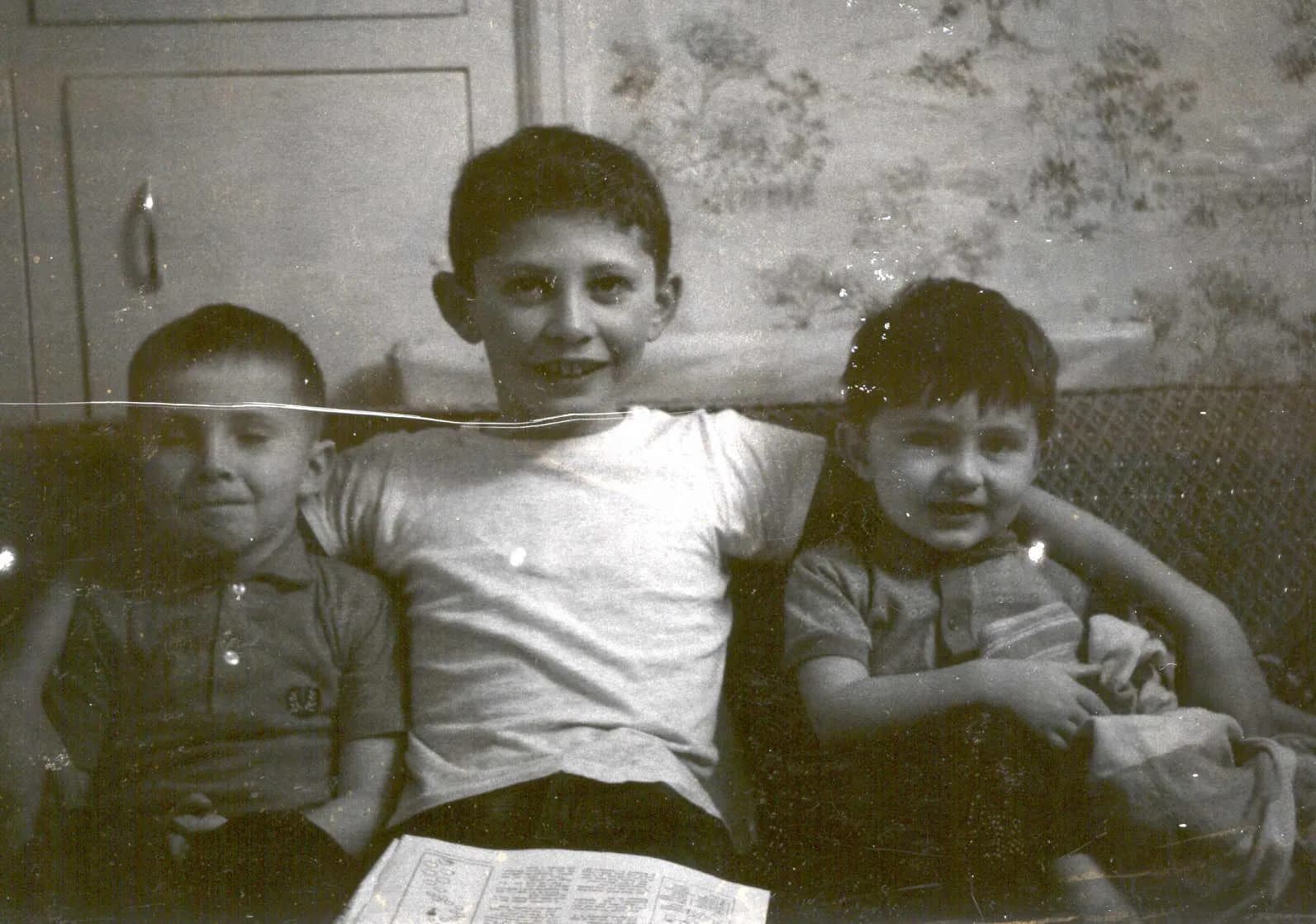
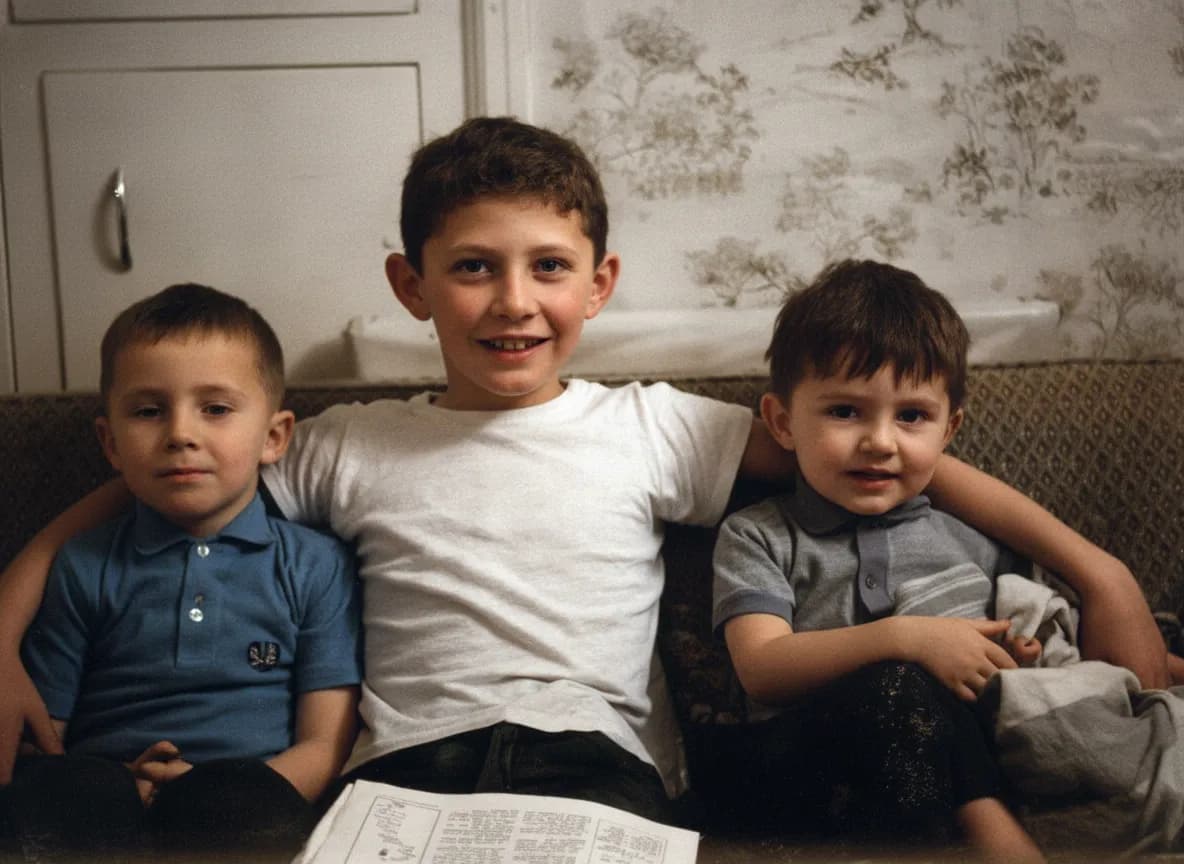
An enhancer raises detail everywhere in the frame, and damage is detail. That is why testers running Picsart's restoration on scratched prints find the scratches still there, sometimes more visible than before. RestorePhotosApp's restore style identifies the crease, the tear, and the dust as damage, removes them, and rebuilds the missing area from what surrounds it. You get a photograph without the damage rather than a crisper photograph of the damage.
Nothing to paint by hand
Picsart's route to a clean print runs through the Remove and Heal brushes: zoom in, trace the scratch, repeat. It works, and on a whole box of photos it is hours of careful manual work behind a paid plan. On RestorePhotosApp the same outcome is the default result of one upload, which is the entire reason the tool exists.
One pass for damage, colour, and faces
A typical restoration candidate is black and white, faded, scratched, and soft in the face. In Picsart that is the restoration tool, then the separate colorizer, then the healing brush. RestorePhotosApp does it in one pass with one model, so colour, repaired areas, and rebuilt facial detail agree with each other. Packs run from $6.99 for 10 credits to $54.99 for 100, with 2 free restorations to test on your hardest photo first.
See the same effect on your own photos.
No watermark. No subscription. From $6.99.
Comparison information is based on publicly available product details and may change. Last updated 2026. Read how we test photo restoration tools.
About Picsart
Picsart is one of the largest photo and video editing platforms in the world, available on iOS, Android, and the web, and widely used for social content. It combines a full editor with stickers, collages, templates, text, and background removal, and a large set of AI tools now presented through its newer Picsart Aura experience. Free use is generous by the standards of the category: you can enhance an image and download it without an account, at standard definition.
Its paid tiers are Pro at $10.50 a month billed annually, or $15 month to month, and Ultra at $37.50 a month billed annually, or $47 month to month. Pro adds background removal, bulk editing of up to 50 images, 100 GB of storage, and a set of AI agents; Ultra raises that to more than a hundred AI models and larger batches. Generative features draw on monthly credits, which Picsart states expire at the end of each billing cycle, while purchased add-on credits do not.
For photo restoration specifically, Picsart offers a dedicated Photo Restoration tool alongside a separate image colorizer. Hands-on reviews are consistent that the restoration tool enhances rather than repairs, and that scratches and creases need the manual Remove or Heal tools instead.
Pros
- +Excellent all-round editor on mobile and web
- +Free enhancement with no account required
- +Background removal, collages, stickers, and templates in one place
- +Good results on photos that are merely soft or slightly faded
- +Bulk editing and a large AI toolset on paid plans
Cons
- −Restoration tool does not remove scratches or creases
- −Damage repair means manual Remove/Heal brushwork, per photo
- −Colorization is a separate tool from restoration
- −Free downloads are standard definition
- −Subscription credits expire at the end of each billing cycle
The alternative
Why people move from Picsart to RestorePhotosApp for old photos
Almost everyone arrives the same way. They search for a way to fix a damaged family photo, find a tool called Photo Restoration, run the print through it, and get back the same photo with the same crease, only sharper. Then they discover that removing the crease means tracing it by hand, on a paid plan, for every photo in the box.
RestorePhotosApp exists for that moment. It is not a better editor than Picsart and does not try to be; Picsart will still be the better place to make a collage or cut out a background. It is a tool that removes the damage automatically, because that is the only thing it does.
Scratches and creases gone automatically
Damage removal is the default result of one upload, not a manual brush step behind a subscription.
Faces rebuilt, not just sharpened
Lost detail in eyes, mouth, and skin is reconstructed so the person looks like themselves again.
Colour in the same pass
Black-and-white originals come back in natural colour without visiting a second tool.
One-time credits from $6.99
Ten for $6.99, fifty for $29.99, a hundred for $54.99. Credits never expire and there is no plan to cancel.
The whole box at once
Drop in every photo you scanned and come back to the finished set instead of retouching one at a time.
Join 470,000+ people restoring their family photos.
No watermark. No subscription. From $6.99.
In practice
A real-world example: the creased 1958 portrait
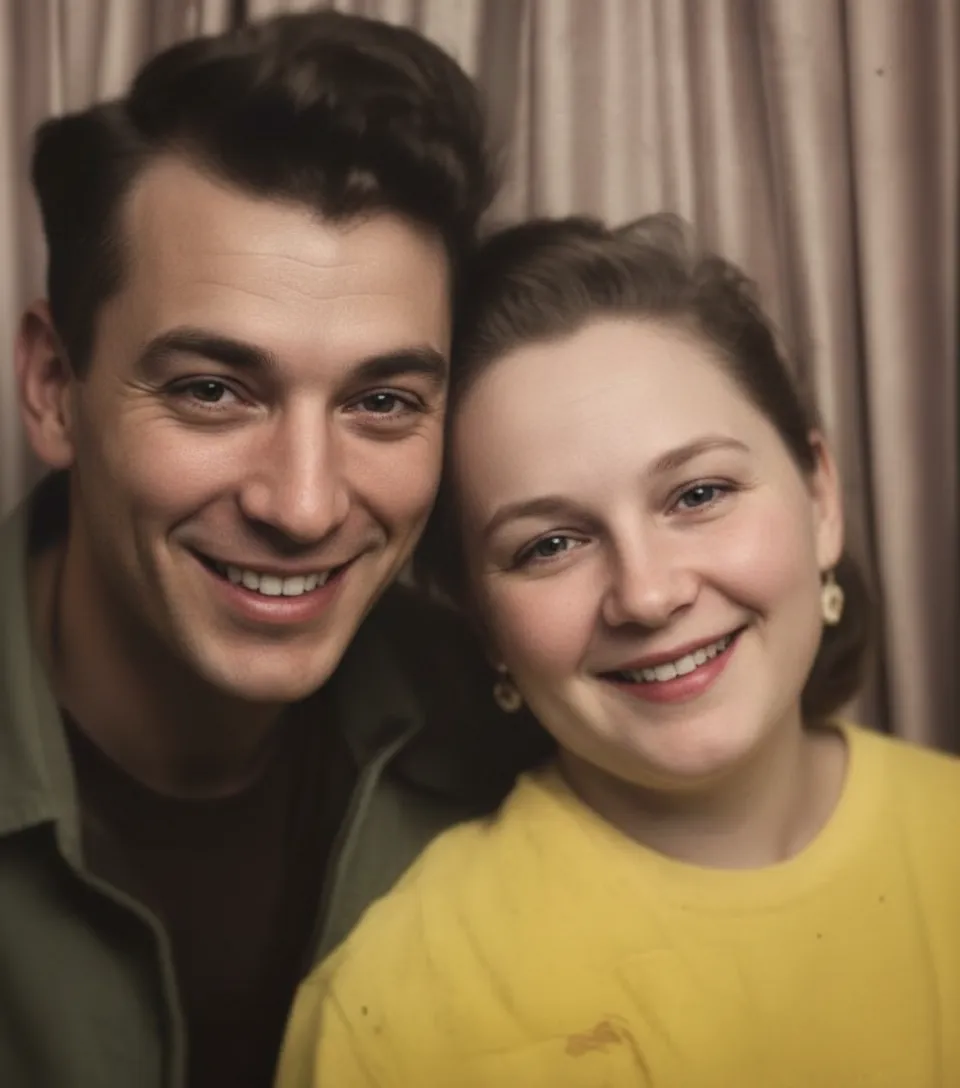
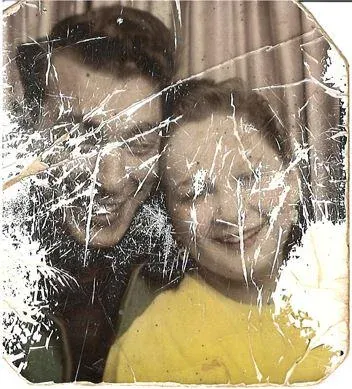
Someone scans a portrait of their grandmother from 1958. It is black and white, the colour has gone brown at the edges, there is a crease running from her shoulder to the corner, and the print has spent decades in a wallet, so the surface is covered in fine scuffs. They find Picsart's Photo Restoration tool, upload it, and get a result in seconds: sharper, brighter, more contrast. The crease is still there and now reads as a hard white line. The scuffs are crisper too.
They read that the fix is the Remove tool, subscribe to Pro, and spend twenty minutes zoomed in tracing the crease. It mostly works. Then they remember there are thirty-nine more photos in the shoebox, and that the portrait is still black and white, which is a different tool again.
The same scan goes through RestorePhotosApp on Restore. The crease and the scuffs are gone, the brown cast is corrected, her face has detail in it again, and it comes back in colour: one upload, one pass. They buy the Family pack for $29.99, drop in the rest of the shoebox, and download the finished set with credits still left over.
The short answer
Which one should you choose?
- The photo has scratches, creases, tears, or stains
- Faces have lost their detail and need rebuilding, not sharpening
- You want black-and-white photos colorized in the same step
- You have a whole box to get through rather than one image
- You would rather pay once than subscribe for a weekend of work
- Your photo is only soft or slightly faded, with no physical damage
- You want collages, stickers, text, and templates in the same app
- You need background removal and general social-media editing
- You are happy to retouch damage by hand, photo by photo
- You already subscribe to Picsart and use it regularly
Made your choice? Restore your first photos today.
No watermark. No subscription. From $6.99.
Bottom line
Final thoughts
Picsart is a very good product being asked to do something it was not built for. Its enhancer improves soft photos and its editor is excellent, but the tool named Photo Restoration enhances rather than restores, and reviewers who test it on real damaged prints say so consistently. The scratches come out sharper, and the actual repair is manual work behind a subscription.
If your photos are merely soft, use Picsart and pay nothing. If they are creased, torn, stained, faded, or black and white, that is what RestorePhotosApp is for. Two free restorations are enough to settle it on your hardest photo. For the wider field, see our best photo restoration apps guide and the comparison hub.
FAQ
Frequently asked questions
Does Picsart photo restoration remove scratches?
Not in the restoration tool itself. Shotkit's hands-on test found that Picsart's Photo Restoration "doesn't remove scratches/creases" and described it as "essentially a photo enhancer being marketed as a restorer." To remove damage you switch to the Remove or Heal tools and trace each scratch manually, which requires a paid plan. RestorePhotosApp removes scratches and creases automatically as part of its Restore style.
Is Picsart photo restoration free?
The enhancement pass is free and you can download a result without an account, at standard definition. The manual damage-repair tools you need for scratches and creases sit behind Pro, which is $10.50 a month billed annually or $15 month to month. RestorePhotosApp gives every account 2 full-resolution restorations free with no watermark, then sells one-time packs from $6.99.
Does Picsart colorize black-and-white photos?
Yes, but through a separate image colorizer rather than as part of restoration, so a black-and-white damaged print needs the restoration tool, the colorizer, and the healing brush to be finished. RestorePhotosApp's restore style repairs damage and adds colour in the same pass, and there is a dedicated colorize style when colour is all you need.
Is RestorePhotosApp cheaper than Picsart Pro?
For a photo-restoration project, yes. Picsart Pro is $10.50 a month billed annually, or $15 month to month, and its monthly generative credits expire at the end of each billing cycle. RestorePhotosApp sells one-time packs of $6.99 for 10 restorations, $29.99 for 50 and $54.99 for 100, and they never expire, with a 30-day money-back guarantee.
Can I restore a batch of photos in Picsart?
Picsart offers bulk editing on paid plans, which applies the same edit to many images at once. That helps with enhancement, but the manual Remove and Heal work that damaged prints actually need is per photo. On RestorePhotosApp you drop the whole batch in and every photo gets the full damage repair.
Can I try RestorePhotosApp before paying?
Yes. Every account gets 2 restorations at full quality with no watermark and no credit card. Use the photo Picsart could not fix and compare the two results side by side.























