
On this page
Quick verdict
Hotpot.ai offers AI art generators, restoration, colorization, headshots, and many other creative tools in one place. If you want a broad creative AI suite, it works well. If you only care about restoring old photos and want predictable per-photo pricing, RestorePhotosApp is more focused and offers a cleaner pricing model.
Choose RestorePhotosApp
Best for users who only need photo restoration with flat per-photo pricing.
Choose Hotpot.ai
Best for users who want AI art, headshots, and creative tools alongside restoration.

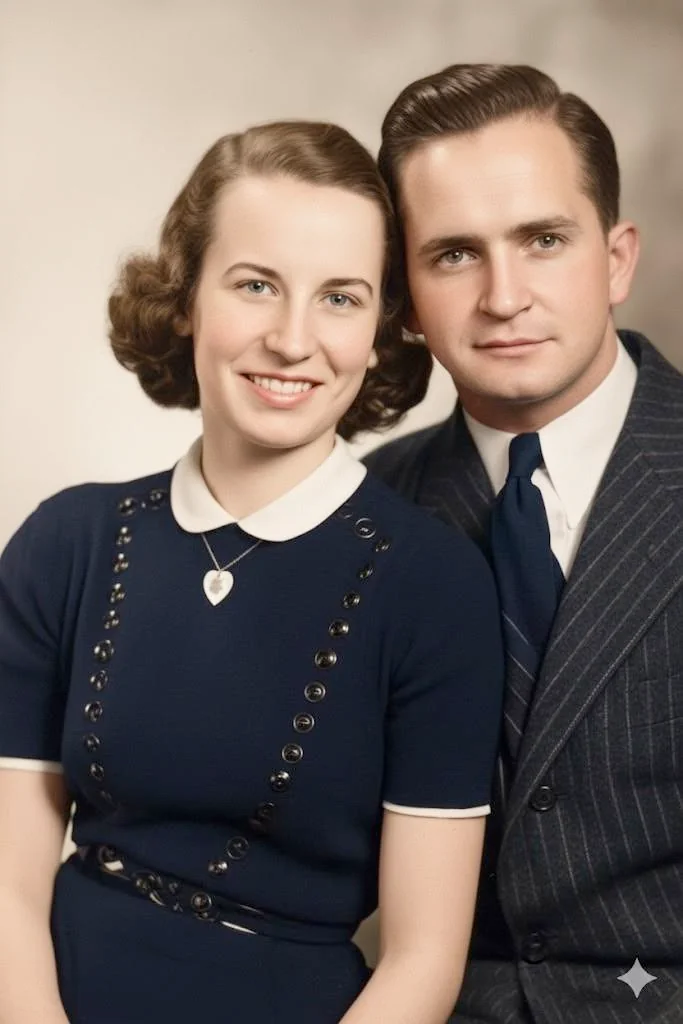
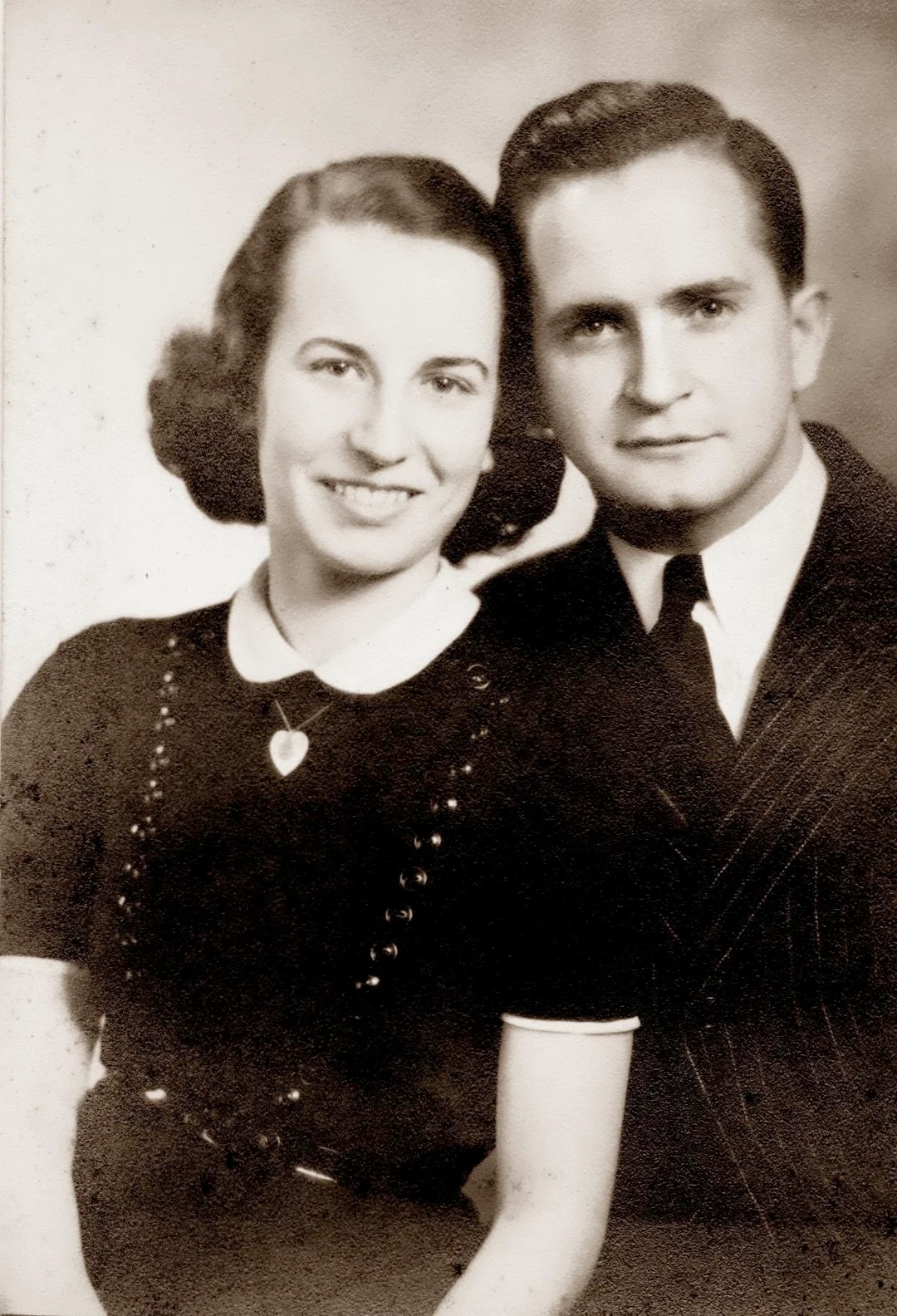
“My grandma cried when she saw her wedding photo restored. Absolutely incredible.”
Maria K.

“Uploaded a blurry photo from the 70s and got back a crystal clear image. Like magic.”
James T.

“Finally recovered old family photos I thought were lost forever. So easy to use.”
Sarah M.
See the difference on your own photos
No watermark · No subscription · From $6.99
The rise of the AI creative suite
In the last couple of years, a new category of AI product has emerged: the creative AI suite. The pitch is simple: instead of having ten different subscriptions to ten different AI tools, you get one platform that does everything. AI art generation, headshot creation, logo design, background removal, photo restoration, sky replacement, and anything else the company can ship a model for. Hotpot.ai is one of the most prominent examples of this category, and there are dozens of others in the same space.
For some users, the suite model is genuinely the right answer. If you are a content creator, marketer, or small business owner who needs many different AI image outputs every week, the convenience of one platform is real. You only have one login to remember, one subscription to manage, and one place to find your work. The downside, that no individual tool gets the same depth of attention as a specialized one, is a fair trade for the convenience.
For most people, though, the suite model solves a problem they do not have. Restoring old family photos is not part of a broader creative workflow. It is a finite, one-time project that only involves photo restoration. If you do not need AI art, AI headshots, or AI logo generation, paying for a creative suite means paying for a lot of features you will not touch. You are essentially buying a Swiss Army knife when all you needed was a pair of scissors.
When generalist quality is good enough, and when it is not
There is no inherent reason a generalist tool has to be worse than a specialist tool. In some categories, the generalist actually wins. Consider how Microsoft Word is fine for most people's writing even though specialized tools exist for screenwriters, novelists, and academics. The question is whether the specific job you are doing is one where the extra depth of a specialist matters.
For photo restoration of old family photos, the depth of a specialist matters more than people expect. The issue is that old face photos have a specific combination of problems (faded skin tones, lost hair detail, scratches that cross the eyes, color casts from yellowed paper, edges damaged from being held in someone's hands for sixty years) that a model trained primarily on general-purpose image enhancement does not always handle gracefully. Specialist models are tuned on data that looks specifically like this, with specific techniques for facial reconstruction and aging reversal. The differences show up most clearly in the hardest photos: the ones with severe damage where you really care whether the AI gets it right.
For modern photos with mild damage or no damage at all, a generalist tool will usually produce results that are essentially indistinguishable from a specialist. The gap opens up at the hard end of the spectrum, and the hard end of the spectrum is exactly where most family photo restoration happens, because the photos people most want to restore are the oldest and most damaged ones.
How to think about the choice
If you are weighing Hotpot.ai versus RestorePhotosApp, the right question to ask yourself is: do I have other AI image tasks besides photo restoration? If the answer is yes (you also need to remove backgrounds from product photos, generate AI art for a blog, make AI headshots for your team), then a creative suite like Hotpot.ai is probably the better choice because the bundled value is real. If the answer is no, and the only thing you actually need is photo restoration, then a specialist tool is almost always going to feel cleaner.
The other question worth asking is whether you want to pay for things you will not use. Suite pricing inherently spreads cost across all the tools, even the ones you ignore. Specialist pricing is just for the one job. For a one-time family photo project, the specialist is dramatically cheaper in absolute terms because you are not subsidizing a dozen tools you have no interest in.
Skip the research — see the result on your own photo.
No watermark. No subscription. From $6.99.
Side by side
RestorePhotosApp vs Hotpot.ai
| Feature | RestorePhotosAppOur pick | Hotpot.ai |
|---|---|---|
| Free tier | 2 full-quality restorations | Limited free credits, watermarks possible |
| Pricing model | One-time credit packs | Credits + subscription tiers |
| Starting price | $6.99 one-time | Varies by tool |
| Cost per photo (best plan) | $0.55 per photo | Varies by tool and tier |
| Subscription required | No | Optional, recommended for heavy use |
| Credits expire | Never | Depends on plan |
| Tool focus | Photo restoration only | AI art, headshots, restoration, more |
| Specialized for old face photos | Yes | No (general purpose) |
| Money-back guarantee | 30 days | Limited |
Specialist photo restoration in 2026
Why specialized photo restoration beats general AI tools
What "specialized for old photos" actually means
Specialization in AI photo restoration comes down to training data and model focus. A specialist model is trained on millions of historical family photos paired with their restored versions as the target output, so the model learns the specific patterns of how aging damages photographs: yellowing paper, edge fading, scratches that follow certain directions, and the way silver halide prints lose detail differently from inkjet prints. A general-purpose image enhancer trained on broad image data does not see these patterns as often and tends to apply generic sharpening or contrast adjustments instead of true restoration.
The practical difference shows up most on the hardest photos. A modern phone selfie with mild blur looks roughly the same after either a generalist or specialist model. A heavily damaged 1940s portrait with creased corners, faded skin tones, and a yellow color cast looks meaningfully better after a specialist model because every element of the model is tuned for exactly that kind of input. This is the case where specialist tools earn their place against bigger, broader AI suites.
Fixing scratches, tears, fading, and missing edges on old photos
The most common damage types on old family photos are surface scratches, light tears or creases, faded color, dust spots, and edge wear from being held by hand for decades. AI photo restoration handles all of these in a single pass: the model identifies the damaged regions, reconstructs the underlying content based on the surrounding context, and outputs a cleaned image without obvious patching or smoothing artifacts. For scratches that cross faces, which are the hardest case, a specialist model trained on facial reconstruction recovers the underlying features more reliably than a general inpainting tool.
Larger missing regions (a torn corner, a missing edge of a print, a section that was glued to an album page and damaged on removal) are harder. The model can usually fill in plausible content based on what surrounds the gap, but the more is missing, the more the result is reconstruction rather than recovery. For minor tears and small missing pieces, the result is usually indistinguishable from the original. For larger missing areas, the result is best treated as a careful approximation.
Restoration for printing, framing, and family memory books
A growing share of family photo restoration projects are aimed at producing physical output: framed portraits as gifts, memory books for milestone birthdays, and slideshow displays for memorial services. For all of these, the relevant quality benchmark is whether the restored image holds up at print resolution rather than just on a phone screen. A specialist tool that outputs full-resolution files without compression gives you more headroom to print at larger sizes without quality loss.
For framed prints, an 8x10 or 11x14 print from a high-resolution AI restoration is usually indistinguishable from a print made from a clean original photograph at the same size. For memory books and album layouts, the same files work without modification. The only common case where you need to be careful is very large prints (16x20 and above), which benefit from upscaling the AI restoration to a higher resolution before printing.
See the same effect on your own photos.
No watermark. No subscription. From $6.99.
Comparison information is based on publicly available product details and may change. Last updated 2026. Read how we test photo restoration tools.
About Hotpot.ai
Hotpot.ai is a creative AI platform that bundles dozens of tools: AI art generators, headshot generators, logo makers, background removers, photo restoration, colorization, and more. It targets a broad audience of creators, marketers, and casual users who want a one-stop AI creative suite.
The breadth of features is the main appeal, and Hotpot.ai keeps adding new tools regularly. Photo restoration is one of those tools, but it is not the central focus of the platform. Pricing is a mix of credits and subscription tiers, which can be flexible but also harder to budget than a flat per-photo price.
Pros
- +Huge variety of AI creative tools in one place
- +Active development with frequent new tools
- +Flexible mix of free and paid options
- +Good for users with many different AI use cases
Cons
- −Photo restoration is one of many tools, not the specialty
- −Pricing varies by tool, harder to predict total cost
- −Free tier may include watermarks or quality limits
- −Generalist quality on face restoration vs. specialized tools
- −More UI complexity than a single-purpose tool
The alternative
Why people choose RestorePhotosApp over Hotpot.ai
The most common reason is specialization. When a tool tries to do dozens of jobs, each individual job tends to be merely good rather than great. RestorePhotosApp does one job (restoring old face photos), and the entire model, UI, and pricing are designed around that one job.
The second reason is the predictable pricing. With Hotpot.ai, the cost per restoration depends on which tool variant you pick, which tier you are on, and how many credits each tool consumes. With RestorePhotosApp, one credit equals one restoration. You always know what you are paying.
Built for old face photos
The AI model is tuned for the exact problems of vintage photos: fading, scratches, color loss, and face degradation. Generalist tools handle these less reliably.
One credit, one restoration
No tier-dependent or tool-dependent credit math. Every restoration costs exactly one credit, which works out to as little as 60 cents on the Family plan.
No watermark on the free tier
Free restorations are full quality, full resolution, no watermark, no credit card. Test the AI on your hardest photo first.
Simpler interface
No menu of dozens of tools to navigate. Upload, pick a style, download. That is the entire workflow.
Credits never expire
Buy 50 credits today and use them whenever you want, even years later. There is no monthly reset.
Join 470,000+ people restoring their family photos.
No watermark. No subscription. From $6.99.
In practice
A real-world example: the focused project
Picture someone who has been putting off restoring their family photos for years. They finally have a free weekend, they have scanned about eighty photos from an old album, and they want to get all of them restored in one focused sitting. They open a creative AI suite, scroll through the menu of tools, and immediately get distracted: there is an AI headshot generator that looks fun, an AI art tool that catches their eye, an upscaler they want to try on a wedding photo. An hour later, they have restored two photos and made an AI portrait of their cat.
This is not a serious productivity claim (adults can focus when they want to), but it is a real pattern. Suite tools are designed to keep you exploring, because the business model rewards engagement across many features. Specialist tools are designed to get one job done, because the business model rewards completing the job and coming back next time.
For a finite project like restoring an old family album, the specialist experience is genuinely better. You open RestorePhotosApp, the only thing on the screen is photo restoration, you upload one photo at a time (or use the bulk tool if you have a Family plan), and you work through your stack until it is done. There is no menu of distractions. The whole experience is shaped around finishing the project, not browsing the platform.
The short answer
Which one should you choose?
- You specifically want to restore old family photos
- You want a focused tool with no menu of options
- You want flat, predictable per-photo pricing
- You want a watermark-free free tier
- You are restoring fewer than 200 photos as a one-time project
- You want AI art, headshots, logos, and restoration in one place
- You frequently use many different AI creative tools
- You are a content creator with many image generation needs
- You want to experiment with new AI tools as they launch
Made your choice? Restore your first photos today.
No watermark. No subscription. From $6.99.
Bottom line
Final thoughts
Hotpot.ai is doing exactly what a creative AI suite should do: it offers many capable tools in one place, prices them flexibly, and continues to add new features. For users with broad creative AI needs, it is a legitimate choice and we are not going to argue otherwise.
For users who specifically and only want to restore old family photos, RestorePhotosApp was designed for exactly that job. The specialist focus shows up in small ways: the model is tuned for old face photos, the interface has nothing extra to distract you, the pricing is one credit per restoration with no exceptions, and the free tier lets you test on your hardest photo before committing. If your only AI image task is family photo restoration, the specialist will almost always be the better fit.
FAQ
Frequently asked questions
Is RestorePhotosApp free like Hotpot.ai?
Yes. RestorePhotosApp gives every account 2 free restorations with no watermark, no credit card, and full resolution. After that, credit packs start at $6.99.
Why is a specialist tool better for old photos?
Specialist tools tune their AI model, defaults, and UI for one specific job. For restoring old face photos, that means better handling of faded skin tones, scratches that cross faces, and the texture of aged photographic prints. Generalist tools have to balance many jobs and tend to produce more average results.
Does RestorePhotosApp do AI art or headshots like Hotpot.ai?
No. RestorePhotosApp is focused entirely on restoring, colorizing, and sharpening old photos. If you also want AI art or headshot generation, Hotpot.ai or another suite is the right tool.
How does the pricing compare?
RestorePhotosApp uses three flat credit packs ($6.99, $16.99, $29.99) where one credit always equals one restoration. Hotpot.ai mixes credits and subscription tiers where cost per output varies by tool. For pure photo restoration, RestorePhotosApp is typically simpler to predict.
Can I get high-resolution output without a watermark?
Yes. Every RestorePhotosApp plan, including the free tier, downloads in full resolution with no watermark. Pro and Family plans include 1080P high-resolution output for printing.
Is my photo private?
Yes. Your photos are stored privately, encrypted in transit, never used to train AI models, and automatically deleted after 30 days.























