

On this page
Quick verdict
Canva is the right tool for what happens after restoration: laying the photo out in a memorial card, an anniversary poster, or a family calendar. Its photo restoration is a Magic Studio enhancer plus third-party marketplace apps such as Restore Old Photos and Revive Photo, and independent reviews report scratches sharpened rather than removed and colorization that bleeds at edges. RestorePhotosApp restores the print first; Canva can design with the result afterwards.
Choose RestorePhotosApp
Best for actually repairing old prints: damage, fading, blur, faces, and colour.
Choose Canva
Best for designing cards, posters, and albums with photos that are already in good shape.

“My grandma cried when she saw her wedding photo restored. Absolutely incredible.”
Maria K.

“Uploaded a blurry photo from the 70s and got back a crystal clear image. Like magic.”
James T.

“Finally recovered old family photos I thought were lost forever. So easy to use.”
Sarah M.
See the difference on your own photos
No watermark · No subscription · From $6.99
Where Canva's restoration actually comes from
Canva has a photo restoration page and it is not empty marketing. Two things sit behind it. The first is the Magic Studio image enhancer, Canva's own tool, which sharpens and upscales; run a slightly soft phone photo through it and it comes out crisper. The second is the Canva Apps marketplace, where third-party developers plug their own AI into the editor. Apps such as Restore Old Photos and Revive Photo promise scratch removal, colorization, and unblurring from inside a Canva design.
The marketing and the results diverge on damaged prints. Reviewers who have tested the apps on real old photos report that scratches come out sharper rather than gone, and that colorization is passable for a social post but bleeds across edges where a sleeve meets a background. That is not surprising: the enhancer was never built for damage, and the apps are small third-party models running inside a design tool, reviewed by Canva for security rather than for restoration quality.
RestorePhotosApp is only a restorer. The restore style removes physical damage, corrects colour loss, and rebuilds the face; the colorize style adds colour to black-and-white originals; the sharpen, cleanup, and enhance styles cover the lighter cases. Everything in the product assumes the input is an old photo of people.
Shared credits and an $18 subscription
Canva's AI features draw from a pool of Magic Studio credits: 50 a month on the free plan and 500 a month on Canva Pro, which now costs $18 per month or $144 per year. Every AI action, from generating an image to removing a background to enhancing a photo, spends from the same pool, and marketplace apps often carry their own limits or charges on top. It is a fair model for a design tool used daily; it is an awkward one for a person who wants to fix forty photos this weekend and then not think about it.
RestorePhotosApp charges per restoration, once. Ten credits are $6.99, fifty are $29.99, a hundred are $54.99, and one credit is always one restoration. The credits never expire and there is nothing to cancel. Restoring forty prints costs $29.99 and leaves ten credits for the next box, rather than $18 for the month plus whatever renews after.
The right order: restore, then design
None of this means Canva has no place in a family photo project. It has the best place: the end. Once the prints are restored, Canva is a fine way to lay them into a memorial slideshow, an anniversary poster, or a printed photo book. The mistake is asking it to do the restoration too.
The workflow that works is to restore the photos in a tool built for that, download the full-resolution results, and drop them into Canva to design with. RestorePhotosApp's two free restorations are a good way to test the first step before committing to either tool.
Skip the research — see the result on your own photo.
No watermark. No subscription. From $6.99.
Side by side
RestorePhotosApp vs Canva
| Feature | RestorePhotosAppOur pick | Canva |
|---|---|---|
| Free tier | 2 full restorations, no watermark | 50 shared AI credits per month |
| Pricing model | One-time credit packs | Monthly subscription (Pro) |
| Starting price | $6.99 one-time | $18 per month or $144 per year |
| Cost per photo (best plan) | $0.44 per photo (Archive, 250 photos) | Shared credit pool, varies by feature |
| Credits expire | Never | Monthly pool resets |
| Scratch, fade, and crease repair | Yes, dedicated model | Marketplace apps claim it; reviews report scratches sharpened, not removed |
| Face recovery on old portraits | Yes | General sharpening only |
| Colorization | Yes, built in | Via third-party apps, colour bleeding reported |
| Design, layout, templates | No | Yes, best in class |
| Money-back guarantee | 30 days | Limited |
Old photo restoration in 2026
What restoration does that enhancement cannot
Removing damage rather than sharpening it
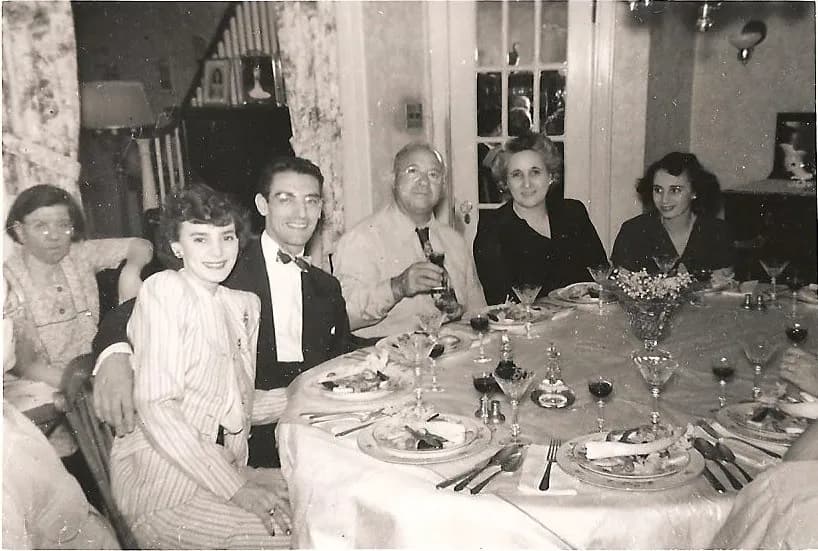
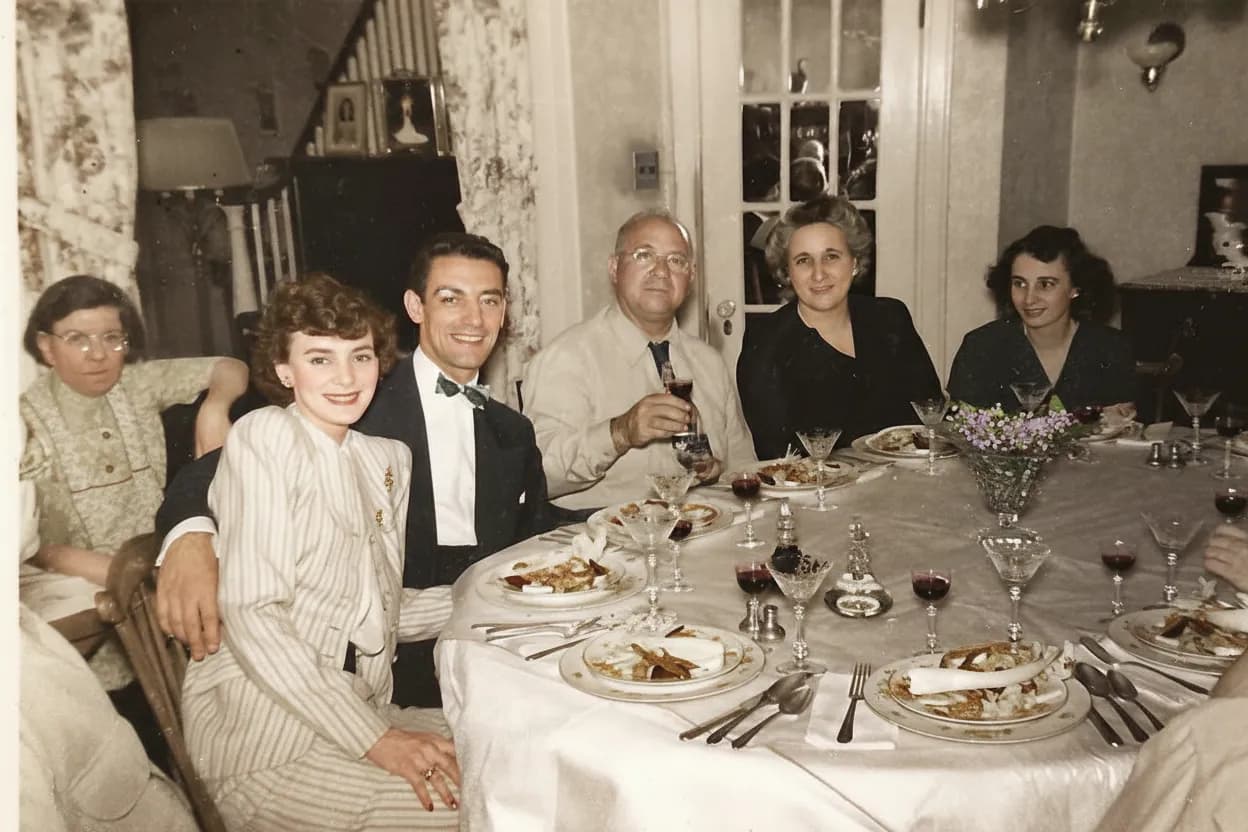
An enhancer makes edges crisper. On a print with a crease, the crease is an edge, and it gets crisper along with everything else. A restoration model recognises the crease as damage, removes it, and reconstructs what was underneath from the surrounding image. The same goes for dust, scratches, and stains. This is the core difference between the two kinds of tool, and it is why reviewers testing Canva's marketplace apps on scratched prints report the scratches coming back sharper.
Recovering a face, not just its outline
Old portraits lose detail in the places that matter most: eyes, mouth, and the texture of skin. General sharpening can only emphasise what is already there. RestorePhotosApp's restore style is trained on faces and rebuilds that lost detail so the person looks like themselves again rather than like a sharper blur.
Colour that stays inside the lines
Canva's colorization comes from third-party marketplace apps, and the most common complaint is colour bleeding: skin tone spilling onto a collar, sky washing into hair. RestorePhotosApp's colorize style uses the same model family that does the restoration, with faces prioritised, so a 1940s portrait can be repaired and colourised before it goes anywhere near a design template. Packs run from $6.99 for 10 credits to $54.99 for 100, with a 30-day money-back guarantee.
See the same effect on your own photos.
No watermark. No subscription. From $6.99.
Comparison information is based on publicly available product details and may change. Last updated 2026. Read how we test photo restoration tools.
About Canva
Canva is the most widely used online design platform, with templates for everything from social posts to presentations and a drag-and-drop editor that non-designers can use immediately. Its AI features are collected under Magic Studio and include image generation, Magic Eraser, Magic Expand, background removal, and an image enhancer for sharpening and upscaling. The free plan includes 50 Magic Studio credits per month; Canva Pro, at $18 per month or $144 per year, includes 500.
For photo restoration specifically, Canva points to the enhancer and to third-party apps in its marketplace, notably Restore Old Photos and Revive Photo, which advertise scratch removal, colorization, and unblurring. As a design tool it is excellent and this page does not argue otherwise. As a restoration tool it is a general enhancer plus small third-party models, and on genuinely damaged prints the results are inconsistent.
Pros
- +Best-in-class templates, layout, and design tools
- +Easy to use with no design background
- +Magic Eraser and background removal are genuinely useful
- +Enhancer helps slightly soft modern photos
- +One subscription covers a huge range of design work
Cons
- −Restoration relies on third-party marketplace apps of mixed quality
- −Reviewers report scratches sharpened rather than removed
- −Colorization via apps, with colour bleeding at edges
- −AI credits are shared across every feature and reset monthly
- −$18 per month for a job that takes one weekend
The alternative
Why people choose RestorePhotosApp over Canva for restoration
The first reason is that Canva's restoration is a marketplace add-on, not the product. People try the enhancer or one of the apps on a scanned print, see that the scratch is still there and the colour has bled, and go looking for a tool that was built for this. RestorePhotosApp is that tool.
The second is the bill. $18 a month is reasonable for daily design work and unreasonable for a weekend of photo repair. One-time credits that never expire match how families actually do this.
A real restoration model
Removes scratches, creases, and stains and corrects fading, rather than sharpening them.
Face recovery for old portraits
Rebuilds lost detail in eyes, mouth, and skin so the person looks like themselves.
Colorization built in
Black-and-white originals get natural colour that stays inside the lines, from the same interface.
One-time credits from $6.99
Ten for $6.99, fifty for $29.99, a hundred for $54.99. Credits never expire.
Works alongside Canva
Restore here, download at full resolution, and design with the result in Canva afterwards.
Join 470,000+ people restoring their family photos.
No watermark. No subscription. From $6.99.
In practice
A real-world example: the memorial slideshow
A reader is putting together a slideshow for a grandfather's memorial and has thirty prints spanning 1945 to 1990. He is already a Canva Pro subscriber, so he tries the Restore Old Photos app from the marketplace on the worst ones and the enhancer on the rest. The modern ones look a little better. The older ones are a mixed bag: the scratches on the 1950s portraits are now sharp lines, the faded 1970s colour is still faded, and the colorized wedding photo has a pink cast creeping from his grandmother's face into her veil.
He runs the worst two through RestorePhotosApp's free restorations, sees the scratches gone and his grandfather's face clear, and buys the Family pack for $29.99. All thirty go through Restore; the wedding photo also goes through Colorize and the veil stays white. He downloads the full-resolution files, drops them into his Canva slideshow template, and uses Canva for what it is good at. Twenty credits are left for the album his aunt is bringing to the service.
The short answer
Which one should you choose?
- Your photos have scratches, creases, stains, or heavy fading
- Faces in old portraits have lost their detail
- You want black-and-white photos colorized without colour bleeding
- You want to pay once for the batch rather than $18 a month
- You want the restoration step done before you design anything
- You need to lay photos out in cards, posters, slideshows, or books
- Your photos are already in good shape and just need a little sharpening
- You already pay for Canva Pro and use it every week
- You want templates, text, and layout in the same tool
Made your choice? Restore your first photos today.
No watermark. No subscription. From $6.99.
Bottom line
Final thoughts
Canva belongs in a family photo project, at the end of it. It is the best tool most people have for turning restored photos into something printed or shared. Its restoration comes from a general enhancer and third-party apps, and on damaged prints they tend to disappoint.
RestorePhotosApp does the step Canva does not do well: it repairs the damage, recovers the faces, and adds colour that stays where it belongs, for one-time credits that never expire. Test it on your hardest photo with the two free restorations, then design with the results wherever you like. For the wider field, see our best photo restoration apps guide and the comparison hub.
FAQ
Frequently asked questions
Can Canva restore old photos?
Canva markets photo restoration, and it works through two routes: the Magic Studio image enhancer, which sharpens and upscales, and third-party apps in the Canva marketplace such as Restore Old Photos and Revive Photo, which advertise scratch removal, colorization, and unblurring. Independent reviews of those apps on real damaged prints report scratches sharpened rather than removed and colour that bleeds at edges. For light touch-ups on decent photos it is fine; for genuinely damaged prints, RestorePhotosApp is built for the job.
Is RestorePhotosApp cheaper than Canva Pro?
For restoration, yes. Canva Pro is $18 per month or $144 per year and its 500 monthly AI credits are shared across every AI feature, with some marketplace apps adding their own limits. RestorePhotosApp sells one-time packs from $6.99 for 10 restorations to $54.99 for 100, credits never expire, and every account starts with 2 free full-quality restorations.
Can I use both together?
That is the recommended workflow. Restore the photos on RestorePhotosApp, download the full-resolution results, and upload them to Canva to design a card, poster, slideshow, or photo book. Each tool does the part it is built for.
Does Canva colorize black-and-white photos?
Not natively. Colorization in Canva comes from third-party marketplace apps, and reviewers report colour bleeding where one object meets another. RestorePhotosApp's colorize style is built in and prioritises faces, so skin tones stay on skin.
Do Canva's Magic Studio credits carry over?
No. The monthly credit pool resets each month, and it is shared across image generation, background removal, enhancement, and every other AI feature. RestorePhotosApp credits are per restoration and never expire.
Can I try RestorePhotosApp before paying?
Yes. Every account gets 2 restorations at full 1080p quality with no watermark and no credit card. Run your most damaged photo through first and compare it with what Canva produced.























